From Insight to Execution
Turn analytical workflows into executable pipelines with scheduling, conditional branching, human approvals, and multi-channel notifications.
If Playbooks are the brain, Actions are the nervous system. They bridge the gap between seeing a signal and acting on it.
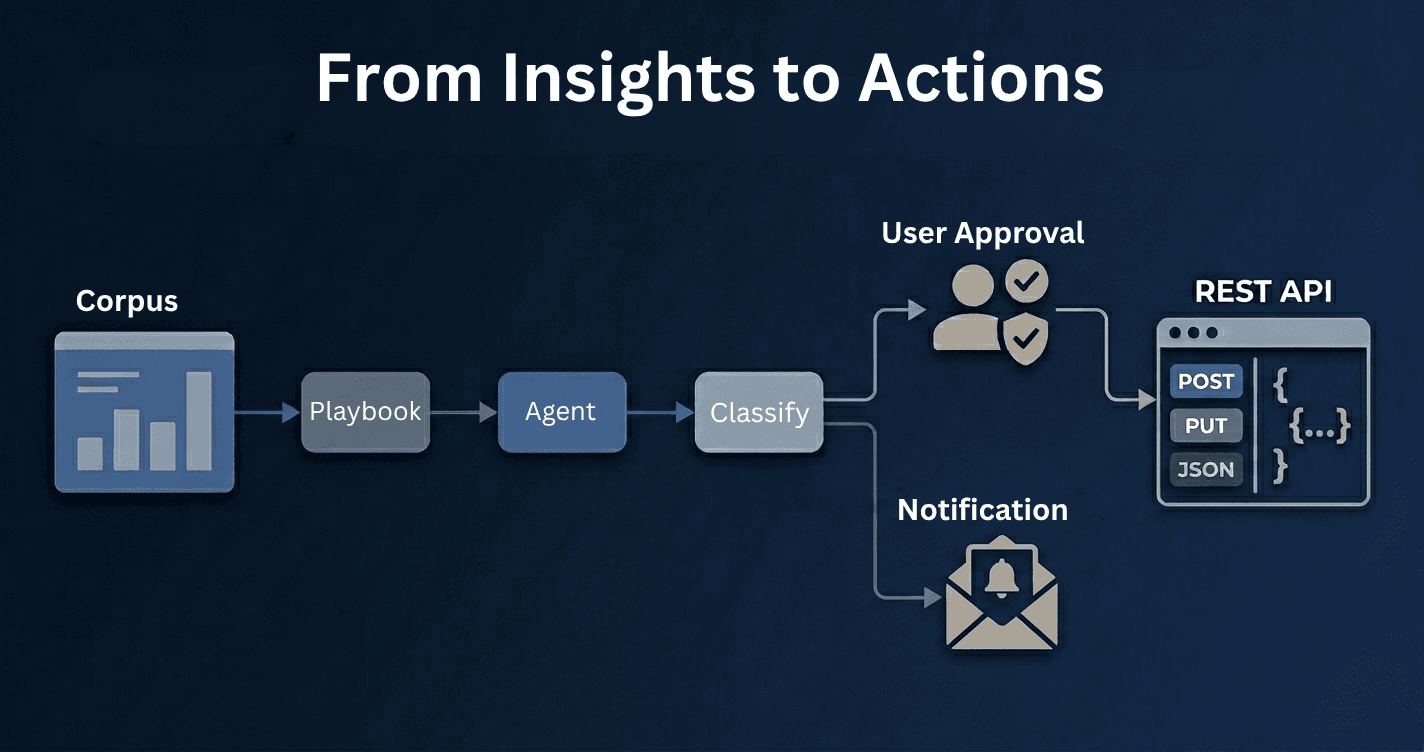
Build Workflows Visually
Design workflows by connecting nodes on a canvas, the same way you would sketch a flowchart on a whiteboard. Except this flowchart executes.
No code, no YAML, no configuration wizards. The platform handles orchestration, parallelism, failure recovery, and notification delivery.
- Drag-and-drop canvas for composing workflows visually
- Distinct node types: Agent, SQL, Metric, Playbook, Classify, Condition, Approval
- Comprehensive validation before deployment, no broken pipelines
- Undo/redo, auto-arrange, zoom controls, and minimap for complex workflows
Outcome: Complex analytical pipelines designed in minutes, not days.
Node Types
Composable building blocks
Initialize workflow
AI-powered analysis
Query data sources
Evaluate KPIs
Embed full playbook
Route by category
Expression branching
Human-in-the-loop
Execution Flow
Conditional branching example
Log and close
Alert risk team
Intelligent Routing
Every Action compiles into a directed acyclic graph (DAG). The platform walks the graph, resolves dependencies, and runs independent branches in parallel.
Classify nodes let workflows reason about their own output and route accordingly. Approval gates keep humans in the loop when judgment is needed, without blocking automation when it is not.
- Directed acyclic graph (DAG) execution with parallel step processing
- Classify and Condition nodes for intelligent routing of downstream branches
- User Approval gates that pause execution and notify via Slack, Email, or Teams
- Configurable failure policies per step: Stop, Continue, or Escalate
Outcome: Workflows that respond intelligently, not just sequentially.
Run on Your Terms
Actions support three trigger modes: manual, scheduled, and event-driven. A daily compliance check, an hourly anomaly scan, a weekly executive summary, all running without human intervention.
Schedule it daily and the team only hears about it when there is something worth hearing about. Every run is logged, every result recorded, every notification traceable.
- Manual: Run on demand from the UI for ad-hoc investigations
- Scheduled: Define cron expressions or intervals for automated runs
- Event-driven: Trigger when a metric crosses a threshold or an external system sends a webhook
- Enable or disable scheduled actions without deleting them
Outcome: Analytics that respond to your schedule and your events, not the other way around.
Trigger Modes
Three ways to fire
Run on demand from the UI for ad-hoc investigations
Cron expressions or intervals with fault-tolerant scheduling
Threshold crossings, pipeline completions, or external webhooks
Execution Monitor
Real-time visibility
Total runs
Success rate
Avg duration
No Black Box
When an Action runs, the platform streams execution events in real time. You see the DAG executing, not just its final state.
Every execution is observable in real time and auditable after the fact. You can trace exactly which branch was taken, which steps succeeded or failed, and what each AI agent reasoned before producing its output.
- Real-time execution streaming over WebSocket as workflows run
- Live node status on the canvas for success, failure, and in-progress
- Full execution logs persisted with step-level input, output, duration, and token usage
- Filterable dashboard with run history, success rates, and step-by-step trace
Outcome: Complete audit trail with step-level detail for every execution.
Close the Loop on Analytics
See how Actions can turn your team's analytical insights into automated, governed responses.